
A five-rep team wants email follow-up, a pipeline and a power dialer. Close puts those jobs in one product. Pipedrive needs a calling partner.
So Close must be cheaper?
In the configuration below, it isn’t. Close Growth starts at $495 a month for five seats. Pipedrive Growth plus five Aircall Professional licenses starts at $445. Both figures use annual billing, before applicable extras.
That $50 gap is small enough for the workflow to decide the purchase. But it is large enough to break the lazy verdict that “all in one always saves money.”
Documentation comparison, checked October 15, 2026. Screenshots are official vendor examples, not a claim that we ran a live outbound trial. Cerrito is building business software; this is an independent editorial comparison, not a vendor endorsement.
The verdict, before the feature list
Calling is the daily workflow.
Your sellers spend their day moving between calls, emails and follow-up tasks. You want one place to own that process, and can justify the plan and usage bill.
The pipeline is the home base.
Your team primarily manages deals and next actions, already likes its phone system, or wants to choose telephony separately. Avoid paying to replace a working stack.
Our default for a small, call-heavy team starting from scratch: trial Close Growth first. For an email-led team with working telephony: trial Pipedrive Growth first. These are starting recommendations, not measured productivity results. The trial checklist below can reverse either verdict.
Compare the plans that do the job
Prices below are USD per seat per month, billed annually. A 50-person company with five sellers does not automatically need 50 selling seats. Subscription minimums and who needs access still matter.
| Job | Close starting point | Pipedrive starting point |
|---|---|---|
| Basic CRM; manual selling | Essentials · $35 | Lite · $14 |
| Automated email follow-up | Growth · $99 | Growth · $39 |
| Power dialing | Growth · $99 + usage | Calling integration + its plan |
| Custom seller roles | Scale · $139 | Premium · $59 for group/individual permissions |
| Predictive dialing | Scale · $139 + usage | Evaluate calling-provider support |
Close Solo is $9 annually billed but restricted to one user; it is not a team price. Pipedrive’s current tiers are Lite, Growth, Premium and Ultimate. Comparisons using Advanced or Professional may refer to older packaging. Close pricing, Pipedrive pricing, Pipedrive’s plan changes.
A checkbox for “calling” hides three different things: placing a manual call, working through a list one number at a time, and predictive dialing. Compare the same job before comparing costs.
What the real interfaces reveal
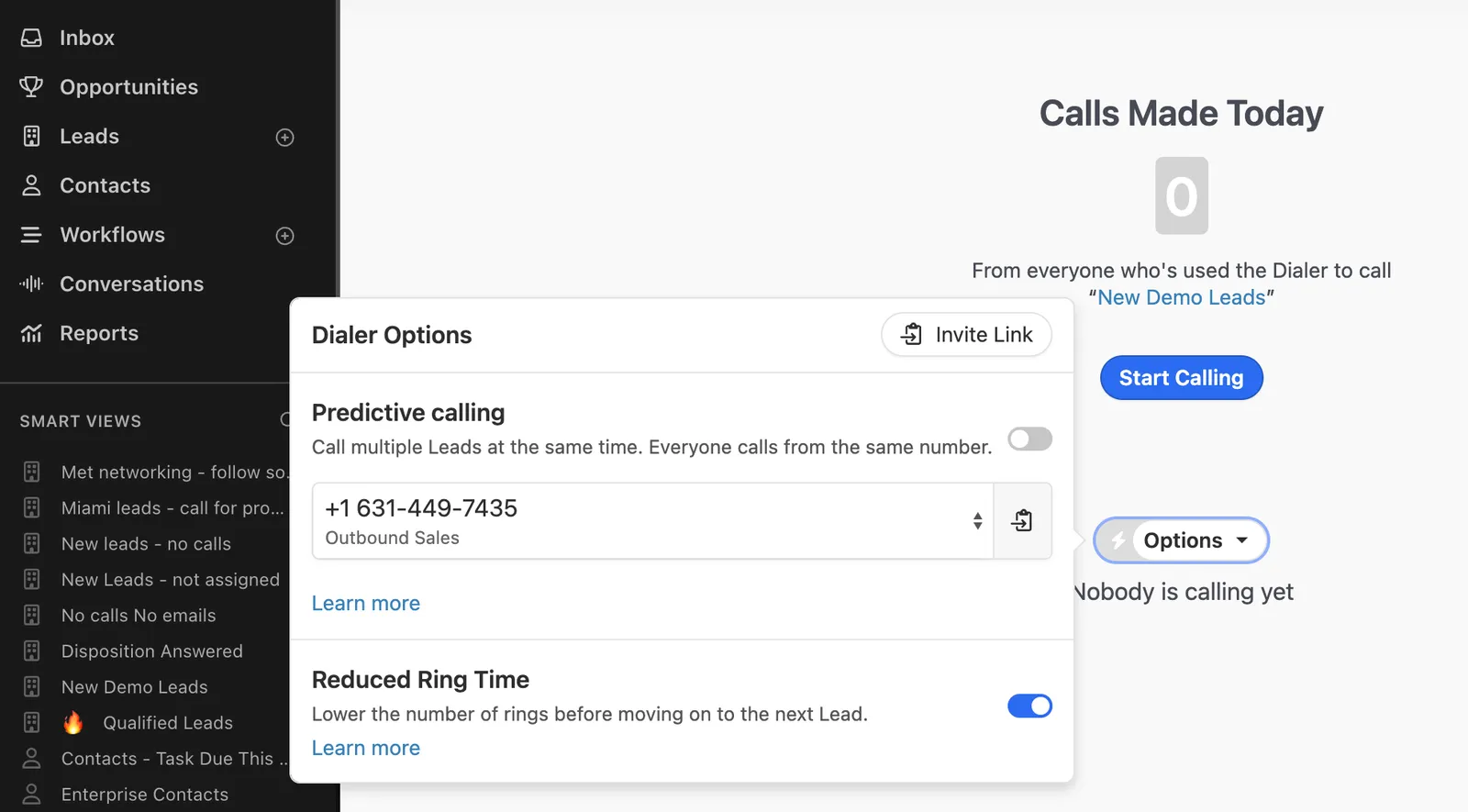
Close’s power dialer works through a Smart View. Its predictive dialer is a different capability, with team-size and lead-visibility constraints. Its documented dialers use the primary number of the primary contact; they do not automatically cycle through every contact at an account. Before buying Scale, demonstrate your exact access model and calling queue together. Do not assume two separately advertised features are compatible. Dialer overview, predictive dialer requirements and limitations.
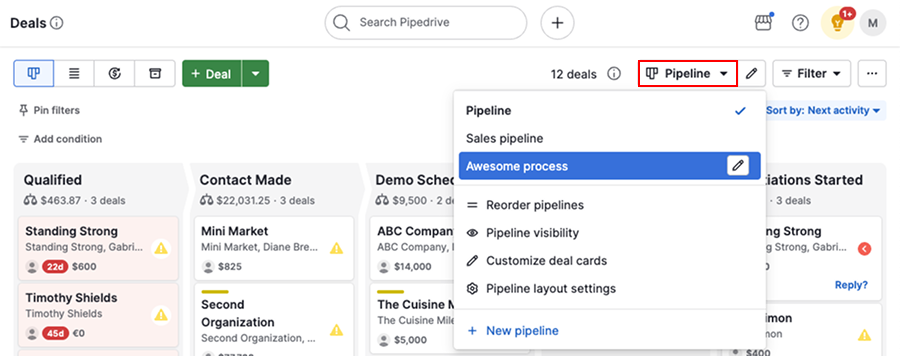
Pipedrive does support calling workflows. Its documentation distinguishes marketplace calling integrations, mobile phone calling and logging, and web-to-mobile calling. Saying “Pipedrive has no calling” erases that distinction. What it does not provide here is Close’s native web calling stack. Pipedrive calling guide.
Feature comparison: the selling workflow
Read ↗ as a separate integration or configuration to verify, not a missing feature. Plan names indicate an upgrade requirement; they are more useful than a wall of checkmarks.
| Communication | Close | Pipedrive |
|---|---|---|
| Email in CRM | ✓ Built in | Growth+ · email sync |
| Automated follow-up | Growth+ · workflows | Growth+ · automations/sequences |
| Web calls and SMS | ✓ Built in; usage charges | ↗ Calling partner |
| Mobile calls | ✓ Mobile app | ✓ Mobile workflow |
| Power dialer | Growth+ | ↗ Provider plan |
| Predictive dialer | Scale | ↗ Provider capability |
| Call coaching | Scale | ↗ Provider plan |
| Data and management | Close | Pipedrive |
|---|---|---|
| Deal tracking | Opportunities | Visual pipelines |
| Custom fields | ✓ | ✓ |
| Custom objects | Supported; tied to a Lead | Verify model fit; don’t equate fields with objects |
| Custom activities | Growth+ | Activity-based workflow |
| Custom access roles | Scale | Premium group/individual permissions |
| Web lead capture | Forms | LeadBooster included in Premium |
| Documents/e-signatures | Check chosen integration | Premium includes contract/e-signature tooling |
| Calling-data ownership | CRM + native communications | CRM + calling-provider boundary |
Sources: Close plans, Close custom objects, Pipedrive plans. Confirm limits, retention and export scope during your trial. “Supported” does not mean unlimited, enabled by default or equivalent across products.
Close also documents a maximum of 100 custom-object instances per Lead across object types. If you are modeling subscriptions, properties or assets, test that structure before migrating. Close custom-object limits.
The important management question is who owns a failed handoff. If a rep calls in another app, does the right deal receive the activity? Can the manager see the outcome? If you change the owner, does the calling queue follow? Integration availability alone doesn’t answer those questions.
The five-seat bill, with the hidden lines exposed
For the power-dialer scenario, Aircall Professional is one concrete Pipedrive-compatible option, not the only option or an endorsement. Its annual US price is $50 per license, with a three-license minimum. Its published package includes US/Canada calling subject to terms and one phone number; extra numbers are $6 monthly, and international/SMS costs need separate checking. Aircall pricing and detailed limits, Aircall’s Pipedrive integration.
| Five selling seats | Monthly subscription floor | Annual subscription floor |
|---|---|---|
| Close Growth | $495 | $5,940 |
| Pipedrive Growth; existing phone system excluded | $195 | $2,340 |
| Pipedrive Growth + Aircall Professional | $445 | $5,340 |
Calculation: seats × annual-billing monthly price × 12. The Pipedrive-plus-Aircall row is 5 × ($39 + $50) × 12. These are subscription floors, not all-in quotes or feature-equivalent packages.
If the team has outgrown this five-seat example, use the B2B startup CRM seat-cost comparison to price 20, 50 or 100 selling seats across a wider shortlist.
Add these lines before deciding:
- Close: numbers, calling destinations/minutes and SMS. Its guide bills calls in whole-minute increments; a 70-second call uses two billable minutes.
- Optional Close Call Assistant: $50 per organization monthly plus $0.02 per minute. Treat this separately from calling charges.
- Calling partner: extra numbers, excluded destinations, SMS and optional products. Verify the contract’s included-use terms.
- Either stack: migration, overlapping contracts and your own implementation time. We have not invented a dollar value for your time.
Close’s variable-usage billing guide.
The break-even question: would eliminating the separate calling workflow be worth more than the subscription difference plus any net usage-cost difference? For the five-seat example, the starting difference is $50 monthly. Ask your reps to show you the friction; don’t substitute a vendor’s time-saved claim for a measurement.
Run this buying test before an annual commitment
Use synthetic records and internal colleagues with permission. You do not need to contact prospects to test the CRM handoffs.
| Test | A pass looks like |
|---|---|
| Import 20 representative records | Relationships, owners and custom fields survive |
| Queue a day’s follow-up | The right records appear; excluded records stay out |
| Log an internal test call | Outcome attaches to the correct record/deal |
| Reply to a test sequence | Later follow-up stops as expected |
| Reassign a deal | New owner sees tasks and history; old access is appropriate |
| Build the weekly report | Rep and manager agree on the numbers |
| Export the test data | Required fields and relationships are recoverable |
For Pipedrive, test with the actual calling provider and plan you intend to buy. For Close, test the actual role restrictions and dialer mode together. Record steps, failures and unresolved requirements. We have not conducted or scored these tests for you.
Where the verdict changes
Choose Close Growth when communication is central, you are starting fresh, and the native workflow passes the test. Move to Scale for a demonstrated requirement such as custom roles or predictive dialing, not because your company has reached an arbitrary employee count.
Choose Pipedrive Growth when the deal board and email follow-up cover the core job and your existing phone system works. Consider Premium when its permission, lead-capture or document features remove a real gap. Price the complete proposed package again after that upgrade.
Choose neither yet if you cannot name the owner of the sales process or export clean customer data. A more expensive CRM will not decide what qualifies as an opportunity or who follows up tomorrow.
Quick answers
Is Close cheaper than Pipedrive?
Not at the subscription floor in our five-seat power-dialer example: Close Growth is $495 monthly versus $445 for Pipedrive Growth plus Aircall Professional, all annually billed. Usage, numbers, plan requirements and existing contracts can change the result.
Can Pipedrive make calls?
Yes. Its official guide describes calling integrations, mobile calling/logging and web-to-mobile workflows. Compare the provider and required plan, rather than treating all calling as one feature.
Is Close Growth enough for an outbound team?
It includes workflows and the power dialer. Custom roles and predictive dialing require Scale. Validate the combination of access restrictions, calling pattern and reporting your team actually needs.
What should we check before switching?
Test imports, relationships, activity history, ownership, suppression behavior and exports. Include a period of overlapping subscriptions in your migration budget. Keep your old system available until the new one passes acceptance checks.
Related: Attio vs folk for relationship-led workflows, Attio vs HubSpot when one requirement reprices the whole plan, and cold email benchmarks for the limits of optimizing the outbound stack.